


Gender: None specified
Location: North America
Rank: Decisive Witness
Joined: Tue Apr 08, 2008 5:02 am
Posts: 295
MS Paint
Pros:
-Intuitive interface
- Easy recolor: put the color that you want the originial color to change to as the secondary color (right mouse button) and the color you want to change from as the left mouse button/primary color, you can just hold the RMB and run it over the picture using the eraser to completely recolor.
(thanks, Shadoninja!)
-Free
Cons:
-While using the pencil, paintbrush, or eraser tool, if you hold the tool down by left clicking and then using the scroll wheel on your mouse, it will draw a line that cannot be undone.
-when you use the eye dropper tool, when you try and grab a color into your primary color you of course left click, but, what I stress to you DO NOT, while holding the left click mouse button with the eyedropper tool, right click at the same time! It will completely undo your last change and you can't Redo it! (Thanks, Percei!)
Used by: Lynx, Shadoninja, Percei, Super Judge Bro
Usenti
Pros:
-Easy recoloring
Cons:
-.png and .gif support only
-Only 256 colors
Used by: Neon Lemmy Koopa
GIMP
Pros:
-Free
-uses layers to help with easy editing/reediting
-easy to use (I learned everything I know simply from messing around with the program)
-open source
-supports most all picture types
-easy animation
-variable frame rates for animations
-there are tons of special effects you can add to pictures built into the program.
-settings get saved when you update the program to a new version so you don't have to reset things.
-quite a few people on CR use GIMP so there are always people around ready to help if you have a problem.
-usable with Tablet PCs
Cons:
-When you first open it allot of the tools are floating in different windows. (But you can drag all the tools to one window. And this is one of the settings that gets saved when you update.)
-Some people have reported having the program close on it's own right in the middle of an edit. (I haven't had this problem.)
-help file must be downloaded separately.
Used by: Donald Serrot, Percei
(Thanks for all of the info, Don!)
Adobe ImageReady
Used by: Ryu
Unfreez (animator)
Pros:
- Small file size, so that you don't have to download the large Photoshop or Gimp just to animate stuff.
- Completely free.
- Pretty straightforward to animate.
- Allows you to set almost any frame speed.
Cons:
- Requires images to be GIF to be animated, but I guess that isn't much of a problem.
Used by: Super Judge Bro
Photoshop
Pros:
-Compatible with a tablet, both pen and eraser side, very useful for rough sketching and planning
-Compatible with very many image formats
-Layers, easier to edit if you have certain things in separate layers
-Very many tutorials for using Photoshop anywhere online, including spriting tutorials
-Comes with ImageReady for animation
Cons:
-Expensive, hard to find "free"
-Takes up a lot of hard drive space, probably not worth the money for someone that just wants to do spriting
Used by: Ellescene
GraphicsGale
Pros:
-There's a free edition, and if you really like it, you can choose to pay for the full version
-Layers, easier editting
-Fairly easy to understand and use
-Comes with animation options
-Recoloring tool
Cons:
-Free edition isn't compatible with .gifs
-Some limited options in free edition
Used by: Ellescene, BigFish
Adobe Fireworks
Pros:
-easy animation
-simple to use
Cons:
-for larger scale projects (not sprites)
-poor mechanics
Users: Lottie, Yuanfang, Harumi Fey, (unwillingly) Percei
Paint.net.
Pros:
-Free
-Almost as many features as PhotoShop.
-Very easy to understand.
-Supports layers, transparency, etc.
-Pretty good for sprite editing, depending on what settings you have the tools on.
-Very easy to navigate.
Cons:
-More for photo editing than sprite editing, due to some transparency editing things.
-Not as many features as PhotoShop.
-Kinda low on Filters.
Users: Emiga
Sprites for VKCA
Last edited by Lynx on Thu May 15, 2008 1:10 am, edited 10 times in total.


Gender: None specified
Rank: Decisive Witness
Joined: Fri May 02, 2008 1:06 am
Posts: 191
Easy Recolours(with some messy parts)
just add the colour you want to be replaced by having the colour as the primary colour(left click) and the replacement colour as secondary(right click)


Yo Dawg!
Gender: Male
Location: Houston, Texas
Rank: Ace Attorney
Joined: Wed Oct 17, 2007 12:57 am
Posts: 1221
http://www.coranac.com/projects/usenti/
Gimp Photoshop etc are too much for just spriting
Yo Dawg!
Gender: Male
Location: Houston, Texas
Rank: Ace Attorney
Joined: Wed Oct 17, 2007 12:57 am
Posts: 1221
Gender: Female
Rank: Decisive Witness
Joined: Mon Dec 31, 2007 9:19 am
Posts: 170
It's basicly universal. If you need to sprite on another computer, you can bet it has paint.
I love my paint, I really do. I use it for all my spriting.
I may or may not be here.
Gender: Male
Location: Drinking a mug of hot chocolate
Rank: Ace Attorney
Joined: Thu Nov 29, 2007 11:58 pm
Posts: 4916

Almost everything I make is made in GIMP!

The userbars were made in a special userbar program.
GIMP
Pros:
-Free
-uses layers to help with easy editing/reediting
-easy to use (I learned everything I know simply from messing around with the program)
-open source
-supports most all picture types
-easy animation abilities (Again, I learned all I know from messing with the program. Mostly opening someone else's animations and seeing what was used to make them.)
-there are tons of special affects you can add to pictures built into the program.
-settings get saved when you update the program to a new version so you don't have to reset things.
-quite a few people on CR use GIMP so there are always people around ready to help if you have a problem.
-did I mention it's a free program? XD
Cons:
-When you first open it allot of the tools are floating in different windows. (But you can drag all the tools to one window. And this is one of the settings that gets saved when you update.)
-Some people have reported having the program close on it's own right in the middle of an edit. (I haven't had this problem.)
-help file must be downloaded separately.


Gender: None specified
Location: I AM BACK, LURKING~
Rank: Donor
Joined: Sun Oct 28, 2007 6:06 pm
Posts: 4838
Anyway, I KNEW there was a thread similar as this but my forum's Search link doesn't work
 ..... can anyone else do this?
Search for these keywords: sprite edit program
Thank you!
 Hmmmm... whatever, it is time to
(7o_o)7 Sprite Arts Game char Deja-vus? Chores AA char in 3D! Ryu ♥ CR!
People should live freely without constraints.
That's how life should be! - Richard Wellington

My name is Judge.
Gender: Male
Location: Just Outside Your Peripherals
Rank: Ace Attorney
Joined: Fri Mar 21, 2008 5:47 pm
Posts: 1607
Another glitch to be wary of is when you use the eye dropper tool, when you try and grab a color into your primary color you of course left click, but, what I stress to you DO NOT, while holding the left click mouse button with the eyedropper tool, right click at the same time! It will completely undo your last change and you can't Redo it! Now I know this might not be a horrible problem for some people, but when you've only got 3 Undos (as you do in XP, as compared to 5 in Vista), this can be a major issue, as it was for me one time.

I obviously use Paint, but little known fact, I also use the Gimp (DUN DUN DUN and all), I find it quite useful, especially for reoloring the outfits on sprites and for animating.
Thanks for listening, hopes this helps.


Gender: None specified
Location: I AM BACK, LURKING~
Rank: Donor
Joined: Sun Oct 28, 2007 6:06 pm
Posts: 4838
Because my fingers are small enough as to prevent such things from happening while I'm using the mouse (also because I've trained using the mouse for more than twenty years)~
Hmmmm... whatever, it is time to (7o_o)7 Sprite Arts Game char Deja-vus? Chores AA char in 3D! Ryu ♥ CR!
People should live freely without constraints.
That's how life should be! - Richard Wellington
Gender: None specified
Location: North America
Rank: Decisive Witness
Joined: Tue Apr 08, 2008 5:02 am
Posts: 295
Sounds like I'll need to try out GIMP for animation! I tried using a weird online program and it was pretty inconvenient.

Sprites for VKCA
Gender: None specified
Location: I AM BACK, LURKING~
Rank: Donor
Joined: Sun Oct 28, 2007 6:06 pm
Posts: 4838
Hmmmm... whatever, it is time to (7o_o)7 Sprite Arts Game char Deja-vus? Chores AA char in 3D! Ryu ♥ CR!
People should live freely without constraints.
That's how life should be! - Richard Wellington

A fad in a castle
Gender: Female
Location: The Gavelshroom Kingdom
Rank: Ace Attorney
Joined: Wed May 30, 2007 9:55 pm
Posts: 3503
Oh and,
Unfreez
A program that allows you to animate images, including sprites of curse.
Pros:
- Small file size, so that you don't have to download the large Photoshop or Gimp just to animate stuff.
- Completely free.
- Pretty straightforward to animate.
- Allows you to set almost any frame speed.
Cons:
- Requires images to be GIF to be animated, but I guess that isn't much of a problem.


I may or may not be here.
Gender: Male
Location: Drinking a mug of hot chocolate
Rank: Ace Attorney
Joined: Thu Nov 29, 2007 11:58 pm
Posts: 4916

Gonna Getcha!
Gender: Female
Rank: Suspect
Joined: Thu Sep 13, 2007 3:36 am
Posts: 33
Photoshop:
Pros:
-(personal) I've used Photoshop for maybe like half my life so I know all (or many of) the shortcuts, tricks, and tips
-(personal) Compatible with a tablet, both pen and eraser side, very useful for rough sketching and planning
-Compatible with very many image formats
-Layers, easier to edit if you have certain things in separate layers
-Very many tutorials for using Photoshop anywhere online, including spriting tutorials
-Comes with ImageReady for animation
Cons:
-Expensive, hard to find "free"
-Takes up a lot of hard drive space, probably not worth the money for someone that just wants to do spriting
GraphicsGale (link)
Pros:
-There's a free edition, and if you really like it, you can choose to pay for the full version
-Layers, easier editting
-Fairly easy to understand and use
-Comes with animation options
Cons:
-Free edition isn't compatible with .gifs
-Some limited options in free edition
I may or may not be here.
Gender: Male
Location: Drinking a mug of hot chocolate
Rank: Ace Attorney
Joined: Thu Nov 29, 2007 11:58 pm
Posts: 4916
I got a Bamboo tablet and GIMP can read pressure and the different tips of the pen. (The "tip" and the "eraser".)
That can be added to the GIMP section. And the link for GIMP is http://www.gimp.org if you want to add that as well.


Gender: None specified
Rank: Medium-in-training
Joined: Sun Jun 24, 2007 6:19 pm
Posts: 449
A nice tool in GraphicsGale is the Color Replacer. It works like the pencil tool, just instead of painting color, it replaces one color with another. It makes having colored lines a lot easier to make.
My name is Judge.
Gender: Male
Location: Just Outside Your Peripherals
Rank: Ace Attorney
Joined: Fri Mar 21, 2008 5:47 pm
Posts: 1607
Cons: Very Complicated/Confusing: So many buttons and confusing controls that it takes a graphics expert to understand it.
Impractical Mecanics: OK, FW lacks (as far as I'm aware) a bucket fill tool. So, you set your line tool to the thickest setting, and fill the picture with COLOR *insertdazzlingsmileyhere*. So, then you wanna move a little sketch you do to the other side of the picture... Well guess what, your gonna spending 3 minutes trying grab the sketch and not one of the parts of the back ground. Fireworks makes every time you click the mouse, until you let go of the mouse button an individual grabable object. Another example. C&P say Terry Fawles, then draw some jail cell bars, and lets say each bar is 4 vertical lines each, well you wanna move the bars to the left, you'll first try grabbing the bar, you'll move one line, then you'll try grabbing the whole bar with the drag box selector, and you go one or two lines out the peremeter of the bar, and you've also selected Terry Fawles (w00t!!! NOT!)
All in all, FW is not practical whatsoever in making sprites.

The Triumphant Return
Gender: Male
Location: A beautiful Duwang.
Rank: Medium-in-training
Joined: Thu Jan 17, 2008 12:59 am
Posts: 374
Pros:
-Free
-Almost as many features as PhotoShop.
-Very easy to understand.
-Supports layers, transparency, etc.
-Pretty good for sprite editing, depending on what settings you have the tools on.
-Very easy to navigate.
Cons:
-More for photo editing than sprite editing, due to some transparency editing things.
-Not as many features as PhotoShop.
-Kinda low on Filters.
I am personally very happy with it, and use it for all my sprites.

Gunpower, gellatine, dynamite with a laser beam, guaranteed to blow your mind. Anytime.


Gender: Female
Rank: Desk Jockey
Joined: Fri Mar 07, 2008 10:13 pm
Posts: 149
Feel free to call me Jazzy or Harumi.
Gender: Female
Location: America's Hat apparently (Canada)
Rank: Medium-in-training
Joined: Fri Feb 29, 2008 3:34 am
Posts: 590
My name is Judge.
Gender: Male
Location: Just Outside Your Peripherals
Rank: Ace Attorney
Joined: Fri Mar 21, 2008 5:47 pm
Posts: 1607

I meant that it's complicated when you want to do sprite editing, like a simple tweak makes everything ridiculously complicated, but fore more large scale projects it seems to be an OK tool (According to what I read about FW it's supposed to be mainly for Webpage Programmers because it can handle hotspots, the Adobe version of paint Might actually be Adobe Illustrator, never used it before though.)
Also, it's fairly easy to figure out, but more complicated and annoying to use.
Plus I have an easy recolor tip, So, say you have a sprite with three colors (Bright, Medium, and Dark, same configuration on almost all PW1-3 Sprites, not so much on GS4 sprites), but it's all spread out across the outfit, well first things first, find the color you want for each of the three colors (I will usually get it from another outfit from a sprite I have C&Ped elsewhere on the canvas), using the eyedropper tool, put the color you want in the Primary Color Box, and the color you want to replace in the Secondary Color Box. Using the box select tool, drag out a square around the outfit of the sprite's outfit, and then press Ctrl-X and your outfit will dissappear, FRET NOT! Now, click the bucket fill tool and fill the box of color that was left from the Ctrl-Xing (Left Click). Then press Crtl-V and drag the pasted sprite over the box of color, make sure the box is completely gone. Just repeat this process for your other two colors and Voila, a brand new outfit (Note this doesn't work with every sprite.)(Also Note: You can do this with skin recolor usually, but not so much on hair, maybe a few hairstyles though.)
WARNING: This process must be followed to the letter and very straight forward, do not do anything from start of this trick to the end unless it's stated in this process, you could lose a detrimental amount of Sprite Work if you do something else (espically if XP is your OS).
Gender: None specified
Location: North America
Rank: Decisive Witness
Joined: Tue Apr 08, 2008 5:02 am
Posts: 295
Does Paint.net have animation support? I checked their site very quickly and didn't see any touting of that feature, but that doesn't mean it's there. I'm looking to try a new free program. Years ago (ah, the days of my youth, like the scent of fresh lemon, you see), I was turned off of both Photoshop and Paint Shop Pro by what I deemed the complexity of the interface, and I worry that I'll have that problem with GIMP (which sounds like the open source version of Photoshop). However, I'm def. interested in anything with animation.
Anybody else who knows anything, I'd appreciate your opinions too?
I still am not sure I'd want to bother trying to upgrade from Paint, since I'm just so used to it.
Sprites for VKCA
I may or may not be here.
Gender: Male
Location: Drinking a mug of hot chocolate
Rank: Ace Attorney
Joined: Thu Nov 29, 2007 11:58 pm
Posts: 4916
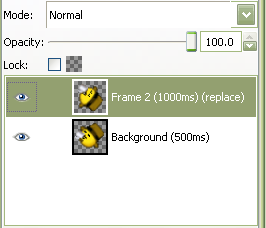
Example: layer 1 (100ms)
The "()" is needed.
Then save as a gif and you are good to go!
It's not that hard of a program to figure out, I was able to figure it out just from playing around with the features.
Edit: Here is a screen shot from a smilie animation tutorial I made and the smilie that goes with it.

Gender: None specified
Location: I AM BACK, LURKING~
Rank: Donor
Joined: Sun Oct 28, 2007 6:06 pm
Posts: 4838

Source: http://fire-doused.deviantart.com/art/K ... y-85688267
Hmmmm... whatever, it is time to (7o_o)7 Sprite Arts Game char Deja-vus? Chores AA char in 3D! Ryu ♥ CR!
People should live freely without constraints.
That's how life should be! - Richard Wellington

...Hopefully someday... xD
Gender: None specified
Location: Suomi, Finland, Perkele!
Rank: Ace Attorney
Joined: Sun Jul 15, 2007 5:05 pm
Posts: 3393
Hilarious!!
....And I use Gimp too ^_^





My name is Judge.
Gender: Male
Location: Just Outside Your Peripherals
Rank: Ace Attorney
Joined: Fri Mar 21, 2008 5:47 pm
Posts: 1607

Gender: None specified
Location: I AM BACK, LURKING~
Rank: Donor
Joined: Sun Oct 28, 2007 6:06 pm
Posts: 4838
Hmmmm... whatever, it is time to (7o_o)7 Sprite Arts Game char Deja-vus? Chores AA char in 3D! Ryu ♥ CR!
People should live freely without constraints.
That's how life should be! - Richard Wellington

pixel artist
Gender: None specified
Location: upstate NY
Rank: Decisive Witness
Joined: Tue Feb 27, 2007 4:06 am
Posts: 215
Some helpful links:
http://bunnystick.com/msptut/8.html MSpaint downloads, including the Windows 98 version of paint, which has some nice features,
http://www.brothersoft.com/giffy-16084.html a giffy download,
http://www.versiontracker.com/dyn/moreinfo/win/13212 and a microsoft Gif animator download.

Who is online
You cannot reply to topics in this forum
You cannot edit your posts in this forum
You cannot delete your posts in this forum
You cannot post attachments in this forum
 News
News